
Gary and Xero
Xero is where Gary gets his work. He reads your sales ledger to find the invoices that are overdue and the customers behind them, then rings those customers for you. Xero stays the source of truth: when a payment lands there, Gary knows, and he stops chasing.
This page covers what the connection does, how to set it up, what Gary can and can’t reach, and the questions people ask most.
What the integration does
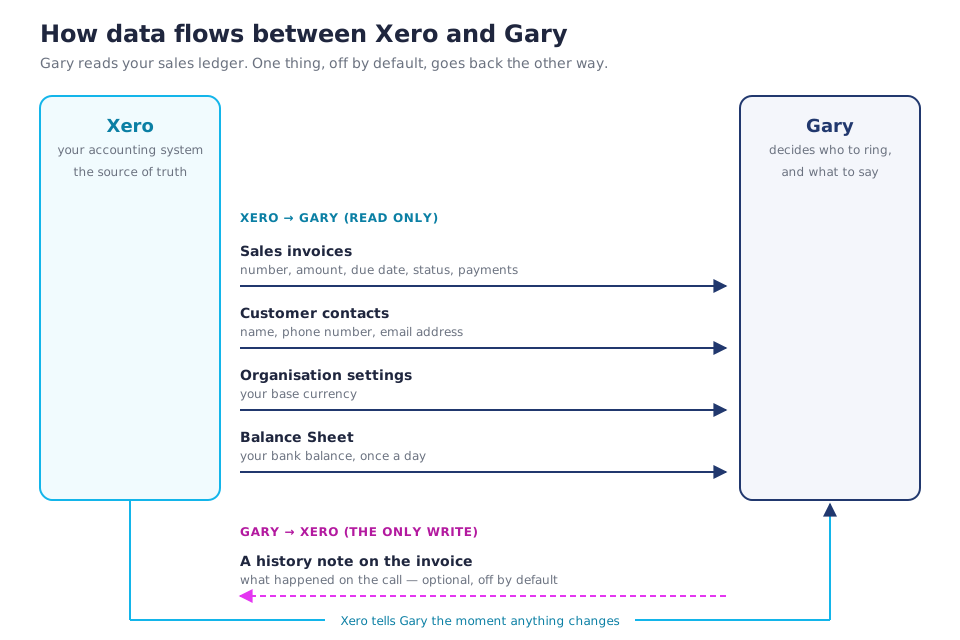
In short: four things flow in, one optional thing flows back. Gary never moves money in Xero, never records or changes a payment, never edits a customer, and never touches anything outside your sales invoices.
Connecting Xero
Setup takes a couple of minutes and you only do it once. See Getting started for the whole first-run journey.
1. Open Integrations
In Gary, go to Integrations and click Connect on the Xero card. Before you click, the What access does Gary ask for? panel on that page lists everything Gary will be able to reach, and why.
2. Sign in at Xero
Gary sends you to login.xero.com — Xero’s own site, on Xero’s own domain. Nothing sits in between. You sign in to Xero as you normally would.
3. Choose the organisation and approve the access
Xero asks which organisation to connect, then shows a consent screen listing the permissions Gary has asked for. Approve it and Xero sends you back to Gary.
Pick carefully. The organisation you choose is the one Gary syncs from then on, and a later reconnect can’t quietly switch it — that guard is there so an accidental click can’t pull another company’s invoices into your account. To point Gary at a different Xero organisation you disconnect and connect again.
Gary is granted access, not your password. Xero gives us a token we store encrypted, and you can revoke it from either end at any time.
4. The first sync
Gary pulls your customers and your overdue invoices straight away, and they appear under Invoices and Approvals within a minute or two. There is nothing to upload and nothing to schedule.
A new account rings nobody on its own. The first sync loads your invoices; it does not call anyone. Your existing overdue pile stays put until you approve it. See Turning Gary on for a customer.
What Gary reads, and what he writes
| Permission Xero asks you to approve | What Gary uses it for | Read or write |
|---|---|---|
| Invoices | Find overdue sales invoices, their amounts, due dates and payments. Fetch the online-invoice link when a customer asks for a copy. | Read |
| Add a history note to an invoice after a call. Off by default — you switch it on. | Write | |
| Contacts | The customer’s name, phone number and email, so Gary knows who to ring. | Read only |
| Organisation settings | Your base currency, so amounts show correctly. | Read only |
| Balance Sheet report | Your bank balance, once a day. Used only in your interest: to time a bank debit so we never bounce one. Never shared, never shown to your customers, kept 90 days. | Read only |
Xero fixes the permission list at the moment you consent, so the invoice permission is asked for as read and write even if you never switch notes on. Asking later would mean a second consent screen for everyone. Nothing writes until you turn invoice notes on yourself.
Which invoices Gary shows you
Gary deliberately reads a narrow slice of Xero. If an invoice isn’t in Gary, this list is usually why:
- Sales invoices only. Money owed to you. Bills you owe (accounts payable) are never read.
- Approved invoices only. Drafts and submitted-for-approval invoices don’t appear, because they aren’t owed yet.
- Overdue, by your rules. Your follow-up rules set how many days past the due date an invoice waits before Gary picks it up, and a minimum amount so small invoices are skipped. Both are in Settings → Follow-up rules.
- Paid invoices, for your numbers only. Gary reads recently paid invoices to work out your average days to payment and collection rate. They’re never chased.
- The customer needs a phone number. No phone on the Xero contact means no call. Add one in Xero and it arrives at the next sync.
- New Zealand numbers only. Gary dials NZ numbers. An overseas number shows in the list but isn’t called.
- Not on your do-not-call list. See Do-not-call.
Everything else in Xero — credit notes, quotes, purchase orders, bank transactions, payroll, your chart of accounts, reports other than the Balance Sheet — is outside the connection. Gary can’t see it.
Settings that change what Gary does
The Xero connection feeds Gary the facts; these settings decide what he does with them.
- Approvals — which customers Gary is switched on for, and the org-wide switch that stops him for everyone at once.
- Settings → Follow-up rules — days past due before the first call, the minimum invoice amount, how persistent Gary is, and your calling window.
- Chase new invoices automatically (Settings → Follow-up rules, on by default) — an invoice raised in Xero after your first sync gets chased, even for a customer you haven’t picked. Invoices that were already overdue when you connected are never dialled automatically.
- Invoice notes — off by default. Switch it on and Gary writes a short note into the invoice’s History & Notes in Xero after a call with a real outcome.
How often Gary syncs
- Straight away, on change. Xero sends Gary a notification the moment an invoice or a contact changes, and Gary re-reads that one record. A payment applied in Xero updates the invoice, so that’s the notification that tells Gary an invoice is settled and chasing should stop.
- A weekly full pull, Monday morning, as a safety net for any notification that went astray.
- Your bank balance, once a day.
There’s no manual sync button because there’s nothing to press: the connection keeps itself current.
FAQ
How do I disconnect Xero?
Integrations → Xero → Disconnect, and confirm. Gary hands the access token back to Xero straight away, so the grant is revoked at Xero’s end too, not just forgotten at ours. You can also revoke it from inside Xero, under Connected apps. Either way, Gary stops reading your accounts and stops making calls that depend on Xero. The disconnect is recorded in your audit log.
What happens to my data if I disconnect?
The connection and its token are deleted. The invoices, contacts, call recordings and transcripts already in Gary stay, so your history and your numbers don’t vanish — reconnecting picks up where you left off. If you want that data gone as well, ask us and we’ll delete it. See Privacy and your data.
Does Gary ever change my accounts?
No. Gary can’t record a payment, edit an invoice, create a credit note, alter a customer or touch your chart of accounts. The single exception is the history note, which is off until you switch it on, and a note changes no figures.
A customer paid Gary by card on the call. How do I reconcile that in Xero?
Gary doesn’t mark the invoice paid in Xero — you do, the same as any other payment. Here’s the shape of it:
- The customer pays by card during the call. Gary raises a check payment follow-up telling you the amount and the invoice.
- The money arrives in your bank with your next payout, as one deposit.
- Mark the invoice paid in Xero and reconcile the deposit against it.
The customer pays a small card surcharge on top of the invoice, so you receive the invoice in full — the amount to match in Xero is the invoice amount. See What happens after a call.
How does Gary’s own fee appear in Xero?
It doesn’t appear on your customer’s invoice, and Gary never deducts it there. Gary’s fees come out of your prepaid balance, so what you see in your accounts is your top-ups: each one gets a GST tax invoice by email that you code as a business expense like any other supplier bill. Nothing is taken from the money your customer pays you. See Balance and billing.
Why isn’t my invoice showing in Gary?
Work down Which invoices Gary shows you above — it’s nearly always the approval status, the due date against your follow-up rules, the minimum amount, or a missing phone number on the contact. If the invoice is there but no call goes out, see Troubleshooting.
Can I connect more than one Xero organisation?
One Xero organisation per Gary organisation. If you look after several businesses, create a Gary organisation for each and connect its own Xero — one login switches between them, and nothing is shared. See Working with multiple organisations.
Gary says my Xero connection needs reconnecting. What happened?
Xero access expires if it goes unused for a long stretch, and a change at Xero’s end can end it too. Open Integrations and click Reconnect. Your existing connection keeps working while you’re away on Xero’s screen, and reconnecting doesn’t re-import your old overdue pile as new work.
Do I need to be a Xero admin to connect?
You need a Xero login that can grant an app access to the organisation. If your consent screen doesn’t offer the organisation you expect, ask whoever administers that Xero organisation to do the connect, or to give you the access.
Does Gary read my bank transactions?
No. Gary reads one figure — the bank balance total on your Balance Sheet, once a day — and no transactions at all. It’s used to time a direct debit so we don’t bounce one, and it’s kept 90 days.
More
- Getting started — the whole setup, start to finish.
- How Gary works — what happens on a call.
- What Gary’s built on — the tools behind the calls.
- Privacy and your data — what we store, and for how long.
- Troubleshooting — why a call didn’t go out.